Master Your Day with the Editable Daily Productivity Planner
Let’s be honest: the gap between planning to be productive and actually getting things done often feels like a canyon. We’ve all bought the fancy journals that end up half-empty by February or downloaded apps that become just another notification to ignore. The real challenge isn’t finding a tool—it’s finding a system that adapts to your life, not the other way around. That’s where a truly flexible resource comes in, one designed not to dictate your day, but to help you design it.
A Flexible Foundation for Your Workflow
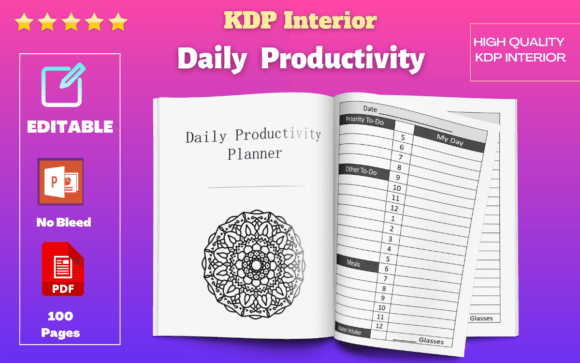
This isn't just another static PDF. The Editable Daily Productivity Planner is built as a dynamic design asset. Delivered in both PowerPoint and PDF formats, it’s crafted for people who actually use their tools. The PowerPoint file is completely editable. This means you can adjust layouts, change text, modify color schemes, and tailor every single page to your specific brand or personal preference. Whether you're a brand strategist creating a cohesive suite of materials for a client, or a small business owner wanting your daily plan to match your logo colors, the control is in your hands. The included PDF is ready for immediate use—perfect for printing a stack for your desk or uploading directly to a digital planning app.
Visually, the planner embraces a clean, modern typography approach. It avoids clutter, using clear headings and ample white space to create a calm, focused environment on the page. The overall style is professional yet approachable, making it suitable for a corporate setting or a creative studio. Its personality is that of a reliable assistant—unobtrusive, organized, and ready to support whatever you throw at it. The high-quality resolution interiors ensure that whether you're viewing it on a high-res tablet or printing it on your home printer, the lines and text remain crisp and legible.
Integrating into Your Creative and Business Ecosystem
Think of this planner as a versatile component in your larger toolkit. For content creators and bloggers, it can serve as an editorial calendar, a content batching schedule, and a social media planning sheet all in one. The ability to edit the PowerPoint file means you can create a template for each month, saving it as a new file to track progress. Entrepreneurs and marketers will find its structure ideal for breaking down quarterly goals into daily actionable tasks, helping to maintain focus on what truly moves the needle.
The practical applications extend far beyond simple to-do lists. Consider these uses:
- Client Projects: Use a customized version to share a visual project timeline with a client, enhancing transparency and professionalism.
- Product Launches: Plan every detail of a launch sequence, from pre-release teasers to post-launch follow-ups, ensuring consistency across all channels.
- Personal Development: Track habits, reading goals, or fitness milestones alongside your work tasks for a holistic view of your productivity.
- Digital Products: For those in the low or no content business, this planner itself is a prime example of a sellable asset. You can customize it, add your own branding, and resell it as part of your own product line (thanks to the commercial use license).
Design Decisions That Drive Engagement
A well-structured planner does more than list tasks; it influences your behavior. The layout of the Editable Daily Productivity Planner is designed to promote visual hierarchy. By having distinct sections for priorities, schedules, and notes, it guides your eye and helps your brain categorize information. This reduces cognitive load, making it easier to start your day with clarity. When your planning tool is visually harmonious and logically organized, it can positively impact your brand perception—even if the brand is just you. Using a consistent, well-designed planner day after day builds a sense of professionalism and intentionality that spills over into your work.
The 6"x9" size is a deliberate choice. It’s large enough to write in comfortably but compact enough to fit in a bag or sit neatly on a desk without dominating the space. The no bleed and resized vector settings ensure that if you choose to print it, the edges will be clean, and the graphics will scale perfectly. This attention to detail is what separates a premium tool from a makeshift one.
Making It Your Own: Practical Implementation
Getting started is straightforward. Open the PowerPoint file. If you’re a designer, you might swap the default fonts for a premium font from your library that better matches your client’s brand identity. You could pair a clean sans serif font for body text with a distinctive display font for headers. For a more personal touch, a subtle handwritten font or script font could be used for motivational quotes or section labels.
If you’re not a designer, the beauty is in the simplicity. Use it as-is. The provided structure is robust. Start by filling in your top three priorities for the day. Then, block out your time. The act of writing—whether digitally with a stylus or physically with a pen—engages your memory and commitment in a way that typing into an app often doesn’t. This planner bridges both worlds, offering the flexibility of digital editing with the tactile satisfaction of print.
Ultimately, productivity is personal. The most powerful system is the one you will consistently use. By providing an editable and high-quality foundation, this planner removes the friction of setup and lets you focus on what matters: executing your ideas and achieving your goals. It’s a practical design asset built for real-world application, helping you bring order to the chaos and turn daily intentions into tangible results.